Product documentation
With Tender Management integrated into your Microsoft Dynamics 365 Customer Engagement environment, you can gain better visibility into individual customer requirements and reduce the risk of counting the same product or service multiple times within a single project. This integrated approach also supports more efficient tender management, helping teams coordinate their activities and meet important submission deadlines.
A tender can be associated with multiple Opportunities. There are several reasons why multiple Opportunities may be created for the same tender.
Alternative Solutions
Each Opportunity may represent a different solution to the same requirement. For example, a tender for the installation of a heating system at a new airport could involve three alternative solutions:
An Opportunity for a gas-powered heating system.
An Opportunity for an oil-powered heating system.
An Opportunity for a solar-powered heating system.
Although three Opportunities are created, only one solution will ultimately be selected and installed.
Multiple Potential Customers
Another scenario occurs when several potential customers request quotations for the same project. For example, an installation company may receive four requests to provide a quotation for the heating system of a new airport. Each request comes from a different construction company competing to become the main contractor for the airport project.
In this case, four separate Opportunities are created, one for each potential customer. However, regardless of which construction company is awarded the contract, the heating system will only be installed once.
Avoiding Duplicate Demand
In both scenarios, multiple Opportunities relate to the same underlying requirement. By associating these Opportunities with a single tender, Tender Management helps distinguish between alternative solutions and competing customer requests, reducing the risk of counting the same potential demand multiple times.
As illustrated in the previous examples, a single Tender can be associated with multiple Opportunities, even though the underlying project will only be executed once.
To prevent the expected revenue from being counted multiple times in the sales funnel, only one Opportunity per Tender is included in the expected turnover calculation. This Opportunity is referred to as the Counting Opportunity.
Whether an Opportunity is designated as the Counting Opportunity is indicated on the Product Line Items tab of the Opportunities associated with the Tender

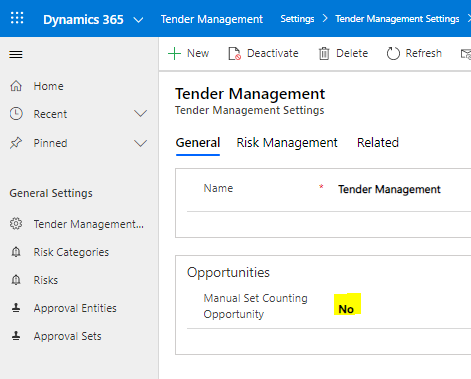
The No Counting Opportunity field can be changed manually without restrictions only when the Manual Set Counting Opportunity setting is set to Yes. When Manual Set Counting Opportunity is set to No, the system ensures that only one Opportunity associated with the same Tender is designated as the Counting Opportunity.
If the No Counting Opportunity field is changed to No for an Opportunity, the system automatically sets this field to Yes for all other Opportunities associated with the same Tender. This ensures that only the selected Opportunity is included in the expected turnover calculation, preventing duplicate counting in the sales funnel.